







Quick Help
Open Encrypted Javascript
First of all you should open files you want to obfuscate in Javascript Obfuscator. To add html page or some .js files you should click "Add File" button on the Toolbar or select "Project/Add File" in the Main menu. You should click the file you want to delete and then click "Delete File" button on the Toolbar or select "Project/Delete File" in the Main menu.
The window "Open dialog" will appear, where you can select .js or .efs files.
You can see that there are several files now in the list of files. You can also use drug-n-drop to add files to the list.

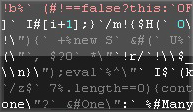
You can compress your files and remove comments and white spaces only. Your source code will be replaced with completely unreadable code. Check the appropriate options on the "Processing" panel.
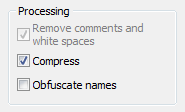
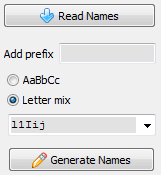
You can also obfuscate names.To do it check "Obfuscate Names" option on Processing panel and click "Read Names" button or select "Project/Read Names" in the Main menu to read names from the added files.
Warning! Use this option with caution. For example, automatic renaming of global or interface variables may cause a script malfunction, so in most cases it requires manual renaming.
Next page Video Tutorial
Download Free Trial Now! (1Mb) Buy Now!
Navigation
- Javascript Obfuscator
- What's New
- Quick Help
- Video Tutorial
- Interface Description
- Open files
- Rename Panel
- Obfuscate Names
- Compress Javascript Code Options
- Rename in Auto Mode
- Process and save files
- Restore from *.bak
- Save Project
- Purchase Full Version
- Download Free Trial
- Contact Javascript-Source.com
- Feedback
Feedback
- "..I've been looking for a flexible obfuscator and I downloaded version of your javascript encrypt tool.."
- "..Javascript Obfuscator greatly compresses size and improves download time of the protect javascript files.."